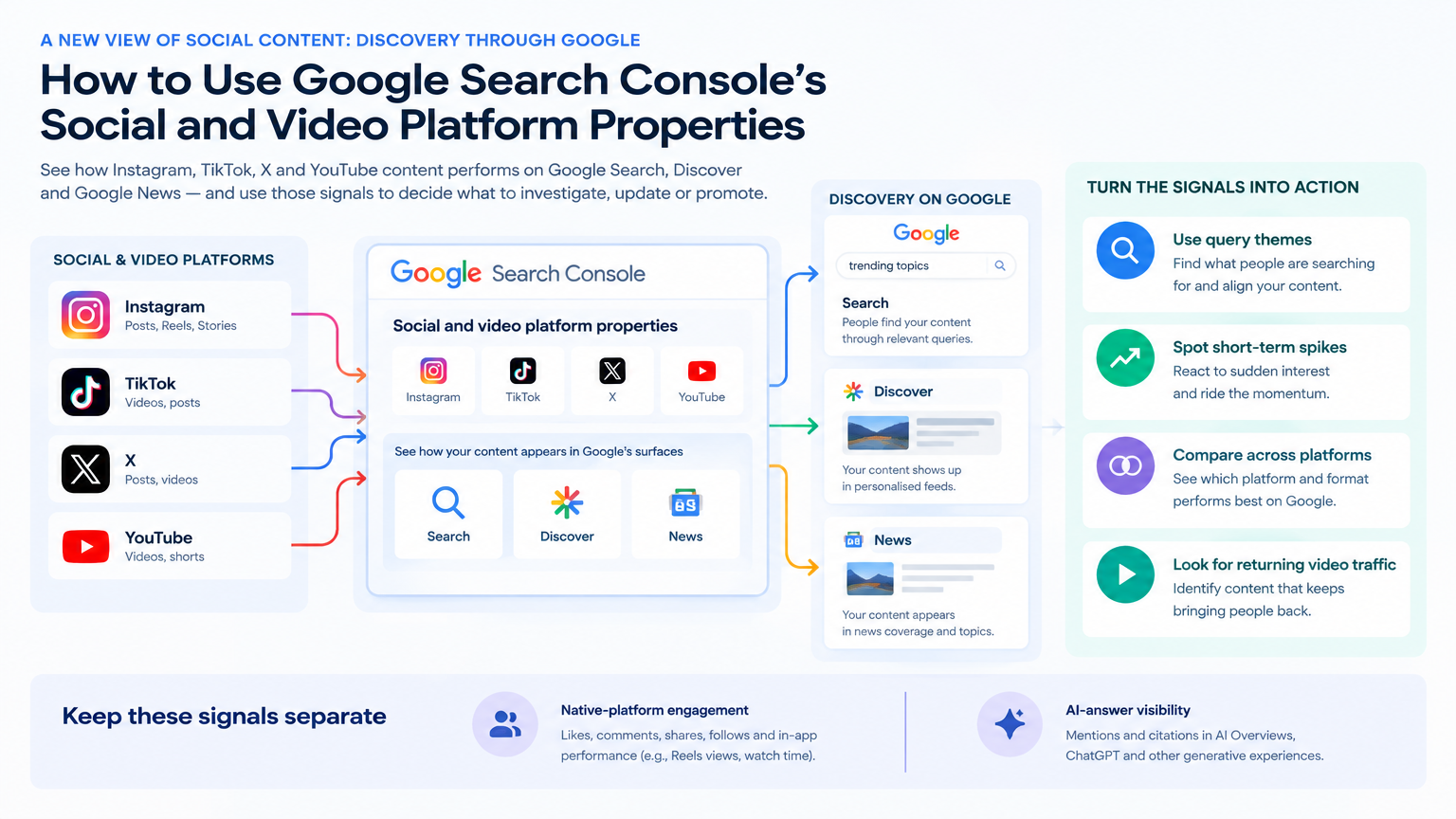
A new view of social content: discovery through Google
Social and video reporting usually starts inside the platform where a post was published. Search Console adds another useful lens: it shows how posts on Instagram, TikTok, X and YouTube perform when people encounter them through Google Search, Discover or Google News.
Google announced on July 29, 2026 that these platform properties were globally available. Their value is not that they replace your existing channel dashboards. They help answer a different question: Which social and video content is earning attention through Google’s surfaces, and what does that search audience appear to be looking for?
That distinction matters in campaign planning. A post might perform modestly in its native feed but attract people searching for a specific topic on Google. Conversely, strong engagement inside a social platform does not necessarily mean Google is sending it traffic. Each view describes a different audience context, so keep them side by side rather than blending them into one undifferentiated “content performance” number.
These properties also do not, by themselves, report native-platform likes, comments, shares, watch behaviour or other in-app engagement. Nor do they establish that a post has been cited, recommended or surfaced in an AI-generated answer. They are reporting about performance on the named Google surfaces. If the campaign question is about social engagement, use the native platform’s reporting; if it is about AI-answer visibility, use a suitable AI visibility report. Search Console’s contribution is the Google discovery layer.
Start with the audience signal, not the post count
A useful first question is not simply which post received the most traffic. Ask what people were trying to find when Google sent them to that content. Search Console’s Insights report can help by showing query groups sending traffic to social and video content, including groups trending up or down. Those themes can give the content team a more grounded starting point for its next topic, caption or hashtag strategy.
Treat a query group as an audience clue, not a complete statement of intent. It can point to a concern, product category or information need that deserves a closer look, but it does not tell you everything about the person who searched or why they chose that post. Review the actual content alongside the query theme: does the post address the apparent need, and is there a useful next step for someone who arrives from search?
For an agency, this can make reporting more actionable than a list of top posts. Bring a rising or declining query theme to the strategist, social lead or client team and ask what decision it suggests. A rising theme might merit a follow-up explainer or a clearer caption. A theme that is easing may prompt a check on whether the post still reflects the offer, season or questions the audience cares about. The report is a way to identify where to look; editorial judgment determines what, if anything, to change.
Use short-term movement to decide what deserves attention now
The 24-hour filter gives teams a way to spot recent traffic spikes from Google Search to social or video posts. That is useful when a current campaign is active, a new post is beginning to attract search attention, or an older piece suddenly returns to view. It can help the team decide what to inspect or cross-promote while the signal is fresh.
A spike is a prompt to investigate, not a ready-made explanation. Check which post and query themes are involved, whether the content is timely, and whether it is appropriate to put more distribution behind it. If a post is already gathering relevant search attention, cross-promoting it on another channel may be worth considering. If the spike appears tied to a question the post only partly answers, a follow-up may be more useful than simply amplifying the existing asset.
Keep the time window in perspective. A short-term rise can be useful for operational decisions, but it should not automatically reset a campaign’s priorities or be reported as a durable trend. Note what the team saw, what it chose to do and what it plans to review next. This creates a clearer discussion with a client: the action responds to an observed signal, while the effect of that action remains something to assess.
Compare platforms and formats to sharpen the next brief
When a team manages several platform properties, exporting performance data into one spreadsheet can make side-by-side review easier. The point is not to declare a universal platform winner. It is to notice where content themes or formats appear to be earning Google-surface attention, then decide whether that observation should influence the next brief.
For example, compare how short-form and full-length video content receive search traffic, or use page filters and comparison mode to review video playlists. If a topic is attracting search traffic across more than one platform, the team may have a reason to adapt the idea into a format suited to another channel. If one format is drawing a different search audience, that may be a signal to clarify the audience or purpose before investing in another version.
Make comparisons fair enough to inform a decision. A platform may have a different mix of posts, publishing cadence, age of content or role in the campaign. A spreadsheet can put observations together, but it does not make unlike content equivalent. Compare relevant themes, formats and periods, and explain the context in the client readout. Use the comparison to choose what to explore, not to rank every channel or assume the same content will behave the same way everywhere.
Turn a signal into a measured content decision
An older video regaining search traction is a good example of a signal that can reopen a content decision. Suppose a team notices renewed Google Search traffic to an older video and sees related query themes in the report. It could ask whether the video still answers those searches, whether it merits renewed promotion, or whether a follow-up would better serve the topic. This is an illustrative workflow, not a reported client result.
Search Console can also help teams keep track of changes made outside the site. If someone rewrites a YouTube title or TikTok caption, an annotation can mark when that external update happened so the team can review search performance over time. The annotation adds context to the timeline; it does not isolate the effect of the edit. Other activity and changes in demand can coincide with the same period.
A practical agency workflow is to record a few things for each decision: the query theme or traffic movement that prompted the discussion, the post or format under review, the hypothesis, the owner and date of any change, and the signal to revisit. Then choose a proportionate next action:
Update a title or caption when the wording no longer fits the audience question or the content.
Promote an existing post when it is relevant to a current campaign and the team has a reason to extend its reach.
Develop a follow-up when a search theme points to a useful next question or an incomplete explanation.
Test a related format when the comparison suggests an audience or distribution opportunity worth exploring.
Afterwards, report what changed in Google-surface performance as an observation, not proof that the edit caused it. Look at the content change, timing and other relevant campaign context before drawing a conclusion. Search Console helps teams make a better-informed choice about what to investigate, update or promote. Native-platform reporting and business measures still answer separate questions about in-app engagement and downstream outcomes.
Sources
- Platform properties roll out globally, plus a new social and video performance guide | Google Search Central Blog | Google for DevelopersGoogle Search Central · Accessed Explore publications using this source